Understanding AWS VPC and Subnets
Master AWS VPC and subnet setup with this hands-on guide to cloud networking, IP ranges, routing, and security for beginners.
If you're diving into AWS and cloud networking, one of the foundational concepts you'll encounter is the Virtual Private Cloud (VPC).
What is a VPC?
A Virtual Private Cloud (VPC) in AWS is a logically isolated section of the AWS cloud where you can launch resources (like EC2 instances, databases, etc.) in a controlled network environment. When you create anything on AWS, from EC2 instances to RDS databases, it lives inside a VPC.
Think of a VPC like your own private data center inside AWS:
- You define the IP address range
- Set up subnets to organize and segment your resources
- Configure routing, security rules, and connectivity options like VPNs or peering
Why VPCs Matter
Here’s why VPCs are foundational:
- Security: Resources are isolated from the public internet unless explicitly allowed.
- Control: You define the IP ranges, subnets, and firewall rules.
- Scalability: VPCs are highly customizable and support enterprise-grade architectures.
CIDR Blocks and Subnetting 101
If you've seen CIDRs like 10.10.0.0/16 or 10.10.1.0/24 and wondered what those numbers really mean, here’s a quick breakdown:
The CIDR (Classless Inter-Domain Routing) notation defines the size of your network or subnet.
Example:
1
10.10.0.0/16
This means:
- The first 16 bits are the network portion
- The remaining bits (32 - 16 = 16) are for host addresses
IP Address Math:
| CIDR Block | Available IPs | Breakdown |
|---|---|---|
/16 (32-16 = 16) | 65,536 IPs | 2¹⁶ = 65,536 (minus 5 reserved by AWS) |
/24 (32-24 = 8) | 256 IPs | 2⁸ = 256 (minus 5 reserved by AWS) |
/28 (32-28 = 4) | 16 IPs | 2⁴ = 16 (minus 5 = 11 usable) |
AWS reserves 5 IPs per subnet:
- Network address
- Broadcast address
- Default gateway
- and two reserved for future use
Visual Example:
Let’s say your VPC is 10.10.0.0/16:
You can break this into:
10.10.1.0/24(256 IPs)10.10.2.0/2410.10.3.0/24- … up to
10.10.255.0/24
This lets you organize your VPC into public and private subnets like this:
10.10.1.0/24→ Public subnet10.10.2.0/24→ Private subnet
Subnets — Public vs Private
Inside a VPC, subnets determine where and how resources live inside your VPC. Basically, they are how you divide your VPC into smaller networks, like putting your resources into different rooms of a house.
| Subnet Type | Description | Example Use |
|---|---|---|
| Public Subnet | Can access the internet (if routed via Internet Gateway) | Web servers, bastion hosts |
| Private Subnet | No direct internet access | Databases, backend services |
Availability Zones and Subnets
Here’s a crucial detail: VPCs are regional, but subnets are tied to individual Availability Zones (AZs). That means:
- A single VPC can span multiple Availability Zones (AZs)
- But each subnet must reside in one AZ
This is important when designing fault-tolerant architectures, because placing subnets in different AZs allows you to distribute and replicate resources for high availability.
What is VPC Peering?
VPC Peering is a networking connection between two VPCs that allows internal communication between resources as if they’re in the same network.
Key features:
- No NAT or Internet Gateway required
- Secure: traffic flows entirely within the AWS global network
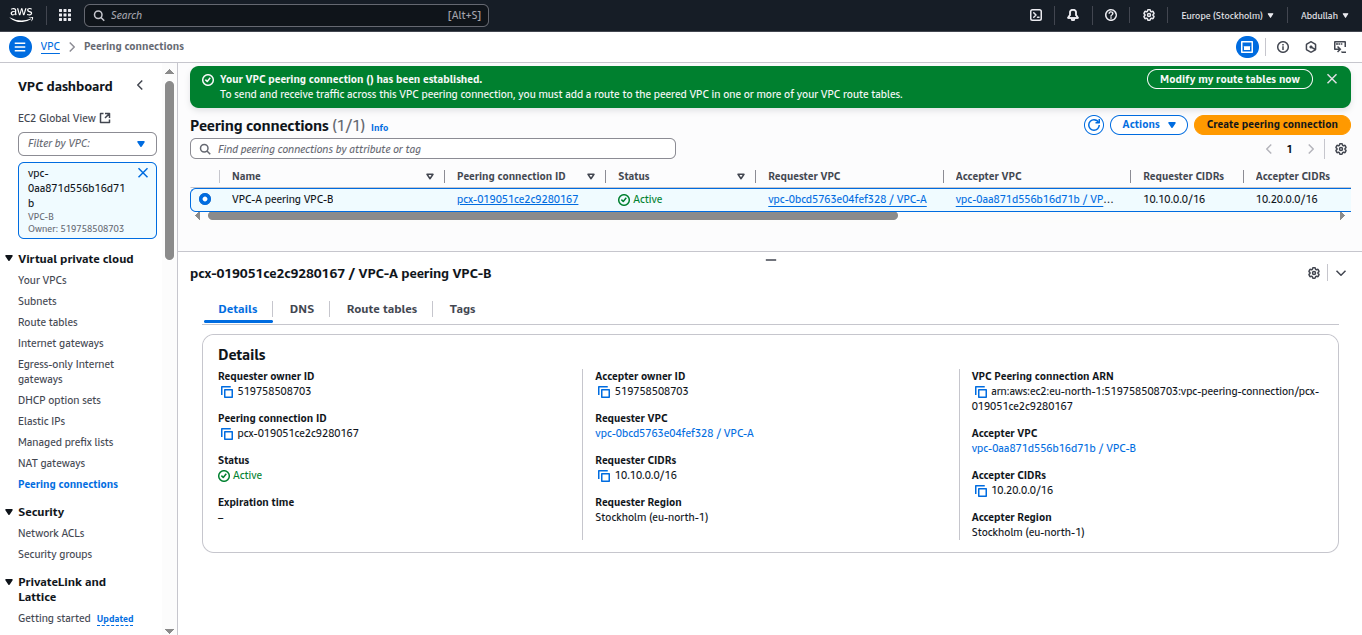
Here’s a screenshot of my peering connection:
Route Tables — Making the Connection Work
To enable communication:
Add a route in VPC-A's route table:
- Destination =
10.20.0.0/16→ Target = Peering Connection ID
- Destination =
Add a route in VPC-B's route table:
- Destination =
10.10.0.0/16→ Target = Peering Connection ID
- Destination =
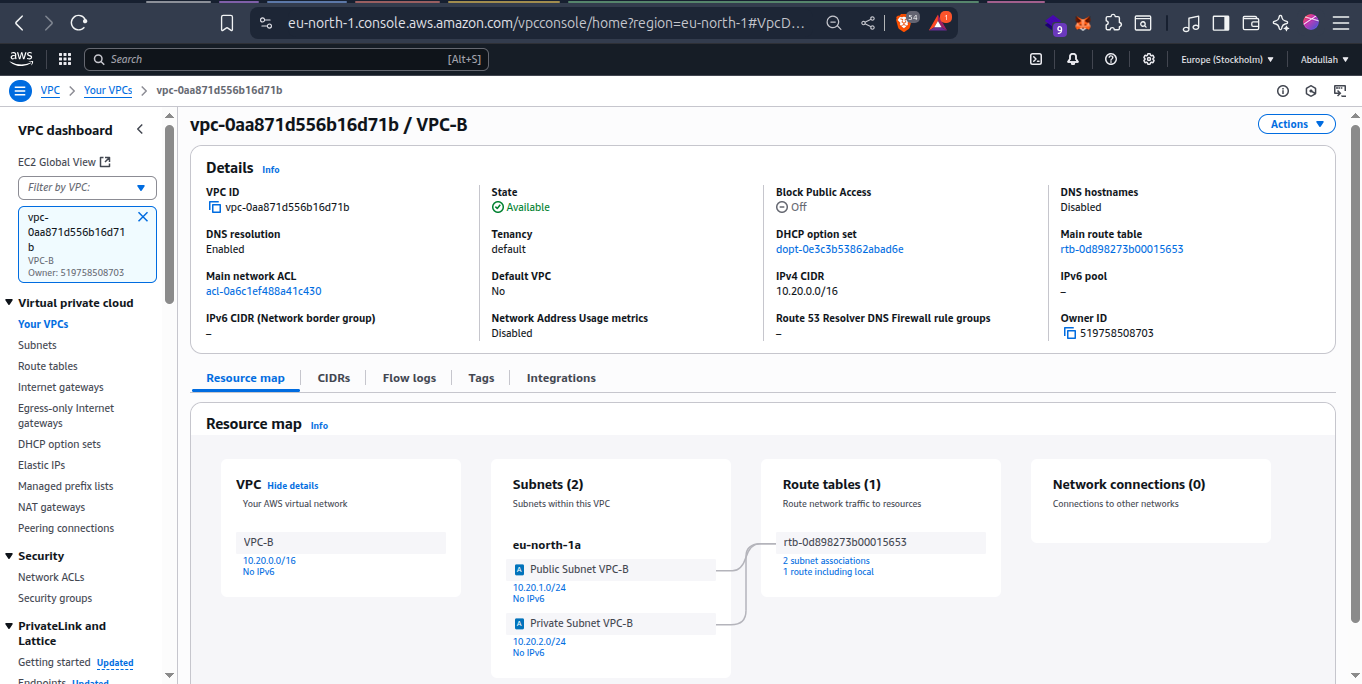
Here’s how VPC-B’s subnets and route table are associated:
In Conclusion
Mastering VPCs and subnets is like learning the foundation of cloud architecture. Whether you're building a simple web app or designing enterprise-grade systems, a solid grasp of CIDR blocks, subnet planning, and route tables will serve you well.